
SoundSwitch 7.0.0 reports a missing .NET runtime at startup
SoundSwitch 7.0.0 reports a missing .NET runtime at startup
If SoundSwitch 7.0.0 shows this message at startup:
You must install or update .NET to run this application. Required: Microsoft.NETCore.App, version '10.0.0' (x64)
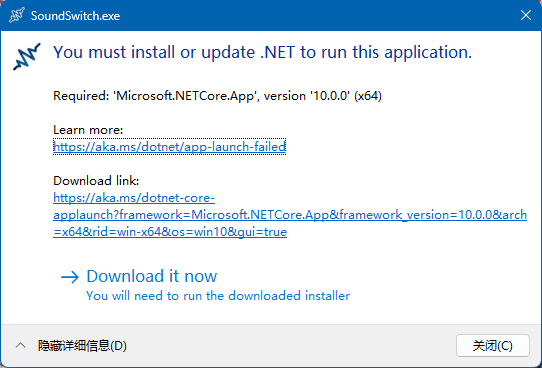
you likely have leftover files from a previous install that prevent SoundSwitch from launching correctly.
Fix steps
- Uninstall SoundSwitch from Windows Apps settings (or from Programs and Features).
- Delete any remaining SoundSwitch files in these folders. Make sure the folder is the actual SoundSwitch install/data directory before deleting it; removing files under
C:\Program Files\...may require administrator rights.C:\Program Files\SoundSwitch\(or your custom SoundSwitch install folder)%localappdata%\Programs\SoundSwitch\— (if installed for your user only)
- Install SoundSwitch again using the latest installer for your hardware (the standard installer on Intel/AMD PCs, the
_arm64installer on Windows on ARM).
After reinstalling on a clean folder, SoundSwitch should start normally.
The .NET Desktop Runtime is bundled in current installers
Starting with the self-contained dual-architecture installers, SoundSwitch no longer depends on a machine-wide .NET Desktop Runtime: each installer bundles the runtime inside its payload and nothing is downloaded at install time. If you see the missing-.NET message above, you are running an old framework-dependent installer — download and run the latest installer instead, and the manual .NET installation below should no longer be necessary.
Manual .NET Desktop Runtime installation (if needed)
If you must stay on an old (pre-self-contained) installer and SoundSwitch still reports missing .NET after reinstalling, install the .NET Desktop Runtime manually, then run the SoundSwitch installer again:
- x64: https://builds.dotnet.microsoft.com/dotnet/WindowsDesktop/10.0.11/windowsdesktop-runtime-10.0.11-win-x64.exe
- arm64: https://builds.dotnet.microsoft.com/dotnet/WindowsDesktop/10.0.11/windowsdesktop-runtime-10.0.11-win-arm64.exe
Source: #2138